


Hiya: Spam Blocker & Caller ID
3.974.41K Reviews
App Specs
- Version
- 15.0.7
- Updated On
- License
- Free
- Downloads
- 10,000,000+
- Developer
- Hiya
- Categories
- Communication
- Platform
- Android, iOS
Screenshots
 Analysis by AppCompare
If you’re like me, you’ve probably experienced the frustration of getting spam calls at the most inconvenient times. You know, those pesky calls that interrupt your day and leave you wondering why you even picked up the phone? Well, I recently downloaded Hiya: Spam Blocker & Caller ID, and I’m here to spill the tea on whether it’s worth your time or just another app cluttering your space.
The problem it is built to solve
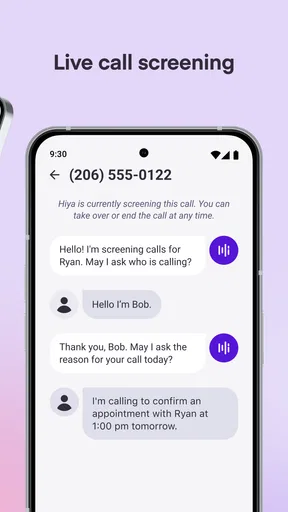
What makes a caller identification app useful is not just recognizing a number after the phone stops ringing. The real value is having enough context while a call is arriving to make a quick decision: answer, let it go to voicemail, or block the number. That is the central promise of Hiya, a free communication app from Hiya that focuses on identifying callers and reducing unwanted interruptions.
That distinction matters if you get calls while working, caring for someone, or waiting for a delivery. A number you do not know is not automatically spam, and a screening app should help you think rather than encourage you to reject every unfamiliar caller. I find caller ID most useful as a prompt to pause, not as proof that a call is safe or dangerous.
First Impressions
So, I hit the download button on Hiya, and it didn’t take long before I was up and running. The app has a pretty straightforward interface, which I appreciated because who has time to figure out complicated setups? The installation was a breeze, and once I got it all set up, I was greeted with a clean, easy-to-navigate dashboard.
One of the first things I noticed was how the app organized its features. Everything was laid out clearly, with options to block calls, identify callers, and even a section for recent activity. It felt intuitive, like I was chatting with a friend who had all the answers to my spam call woes.
Caller ID and Call Blocking
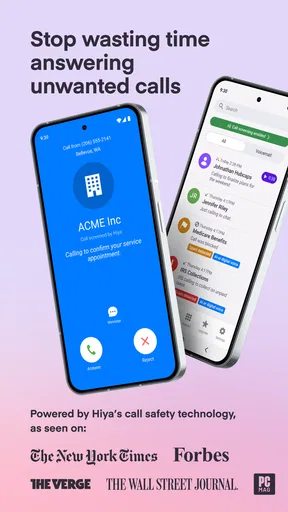
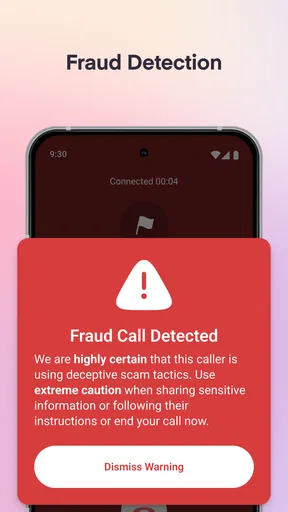
Now, let’s get into the meat of the app—its caller ID and call blocking features. The caller ID is designed to identify numbers as they come in, which is a game-changer for someone like me who hates mystery calls. It uses a robust database to match numbers and provide information on unknown callers. Pretty nifty, right?
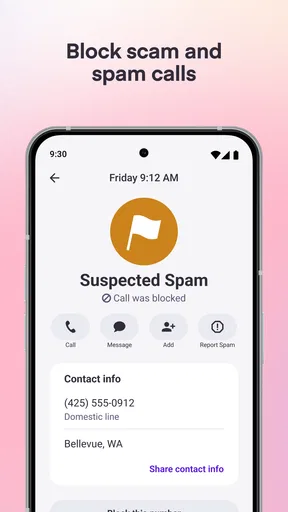
The call blocking feature is where Hiya really shines. It automatically blocks known spam numbers, which means fewer interruptions during my Netflix binges. I can customize the settings to block specific numbers or ranges, making it super flexible depending on my needs. It’s like having a little bouncer for your phone!
Worth Reading Before You Choose

EA SPORTS FC Mobile 26 Is a Bigger Football Game, but It Takes Time

Flipboard Shows What News Apps Must Do Beyond the Feed

Switching to Android Auto Means Rethinking Your Driving Routine

Google Calendar Makes a Crowded Week Easier to Manage

Ludo King Makes the Most of the Minutes Between Plans

Baby Panda World Brings Quick Play to Modern Phones, but Its Game Library Feels Busy
Making caller ID useful without missing a real call
For me, the best way to use an unknown-number label is to combine it with the situation. If I am expecting a call from a clinic, a tradesperson, or someone handling an appointment, I would not treat an unfamiliar number as an automatic no. I can use the identification as a clue, then decide whether to answer or check the recent activity later. That small habit helps avoid the frustrating trade-off of blocking nuisance calls at the cost of missing something important.
A practical workflow is to start with a lighter touch: use caller identification to screen calls, then add specific numbers to a block list when they are clearly unwanted. This is more cautious than blocking broad ranges straight away. A range can be convenient when nuisance calls share a pattern, but it also risks catching a legitimate caller whose number happens to fall within it. I would review any broad blocking choice if I were expecting calls from businesses or services I had not saved in my contacts.
Picture an ordinary weekday: your phone rings while you are in the middle of a meeting, and the caller is not in your contacts. Caller ID can give you a reason to let the call pass rather than interrupting everyone to answer. Later, the activity log gives you a place to inspect what happened, and the reverse lookup can help you decide whether returning the call makes sense. That is a more useful routine than trying to investigate every ring in real time.
Additional Features
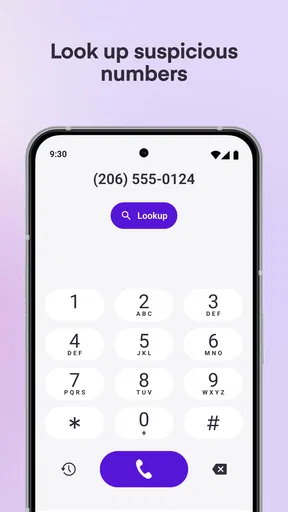
Beyond the basics, Hiya offers a few extra bells and whistles. There’s a reverse phone lookup feature, which lets you search for information on numbers after the fact. This came in handy when I missed a call from a number I didn’t recognize. With a few taps, I was able to find out if it was worth calling back or ignoring.
The app also provides a handy activity log. This shows all the calls that have been blocked or identified, so you can keep track of what’s going on with your phone. It’s like having a mini call center right at your fingertips.
Those two tools work best together: the log helps you remember which calls were screened, while lookup gives you another way to assess one you missed. Neither should be treated as a guarantee about who is calling. If a caller claims to represent a bank, government office, or company and asks for sensitive information, I would contact that organization through a number I already trust rather than rely on an incoming caller label.
How it compares with built-in call screening
Most phones already offer some ways to silence, reject, or manage calls, and those built-in controls may be enough if your main need is blocking one persistent number. Hiya is more appealing when you want caller identification alongside blocking and a record of recent activity in one place. In other words, its value is not simply that a phone can reject a call; it is that you can make a more informed choice about an unfamiliar one.
The trade-off is that an additional caller ID app adds another layer to your phone routine. If you prefer to keep call handling as simple as possible, or rarely receive nuisance calls, the phone’s own settings may be all you need. And if you screen every unknown caller manually, Hiya may feel redundant. I would try it when unknown calls are frequent enough to interrupt your day, then keep only the features that genuinely change how you handle them.
Performance and Usability
I’ve been using Hiya for a couple of weeks now, and I have to say, the performance has been solid. It doesn’t lag or crash, which is a huge plus in my book. The notifications are timely, and the app doesn’t drain my battery life, something I was initially worried about.
Usability-wise, Hiya is quite user-friendly. Even if you’re not tech-savvy, you’ll find it easy to navigate. The learning curve is practically non-existent, which is great for busy folks who just want things to work without a hassle.
One useful check after setup is to look at how the app’s screening choices fit your own calling habits. If a call you expected was blocked or identified in a way that seems wrong, revisit your blocking choices instead of assuming every unfamiliar number belongs in the same category. This is especially sensible for people who rely on calls for work, appointments, or family matters. A little attention to the activity log can make the app feel like a helpful filter rather than an invisible gatekeeper.
Who is likely to benefit most
I would recommend trying Hiya if nuisance calls regularly break your concentration and you want more than a basic reject button. It suits people who often receive calls from numbers they have not saved, but still need to distinguish a possible legitimate call from an unwanted one. The combination of live identification, blocking controls, lookup, and a call history gives those users several ways to handle the same problem.
It is less compelling for someone who seldom gets spam, never answers unknown callers, or already has a call-screening routine that works well. It may also be the wrong fit if you want every unfamiliar number blocked automatically without reviewing the consequences. That approach can reduce interruptions, but it leaves less room for unexpected calls that matter. I would choose the level of blocking based on how costly a missed call would be, not just how annoying a nuisance call feels.
Hiya is rated for Everyone, has an average rating of 4.0 from around 263,000 ratings, and has been installed over 10 million times. Those figures suggest that it has found a broad audience, but they do not tell me whether its approach will suit your particular phone habits. The practical test is whether identification and call history help you make calmer decisions about calls you would otherwise answer blindly or ignore without checking.
Should You Download It?
Alright, here’s my verdict. If spam calls are driving you up the wall, Hiya is definitely worth a shot. It’s efficient, easy to use, and does exactly what it promises. Plus, it’s free to download with some in-app purchases if you want to unlock premium features.
The current version is 14.7.5-11717 and requires Android 6.0 or later. The free starting point makes it easy to see whether caller identification and blocking improve your day before considering any optional purchases, which range from $1.99 to $24.99 per item. I would not pay simply because an upgrade is available; first, decide whether the features you actually use solve a recurring problem for you.
While it’s not perfect—no app is—it does a fantastic job at minimizing the number of unwanted calls. And let’s be honest, having fewer interruptions in our day is something we can all appreciate!
So, if you’re ready to take back control of your phone and say goodbye to those annoying spam calls, give Hiya a try. You might just find it’s the app you didn’t know you needed.
My recommendation is to treat it as a screening assistant, not a promise that every label is definitive or every unwanted call will disappear. Begin with caller identification, use the history and lookup when a missed call leaves you unsure, and block selectively as you learn what is genuinely disruptive. If that measured approach fits the way you use your phone, Hiya can make unknown calls less of a daily interruption; if you prefer a minimal setup or cannot risk filtering legitimate calls, your built-in phone controls may be the better choice.
Pros
- Efficient spam call blocking.
- Accurate caller ID identification.
- Customizable block settings.
- User-friendly interface.
- Minimal impact on battery life.
Cons
- Limited features in free version.
- Occasional false positives.
- Requires internet for updates.
- Some features are region-specific.
- Ads in free version can be intrusive.
FAQs for Hiya: Spam Blocker & Caller ID
What is Hiya and how does it work?
Hiya is a mobile application designed to block spam calls and provide caller ID services. It works by using a vast database of phone numbers to identify incoming calls, allowing users to block unwanted spam calls and see who is calling before answering. This helps users manage their calls more effectively and avoid potential scams.
Is Hiya available for both Android and iOS devices?
Yes, Hiya is available for both Android and iOS platforms. Users can download the app from the Google Play Store for Android devices and the Apple App Store for iOS devices. The app is designed to integrate seamlessly with your phone's existing call management system, providing an enhanced calling experience across both platforms.
Does Hiya require an internet connection to function?
Hiya does require an internet connection to access its database and provide real-time updates for caller identification and spam detection. While basic features may work offline, the most accurate and up-to-date caller information and spam protection require connectivity to the internet, either through Wi-Fi or cellular data.
Are there any privacy concerns with using Hiya?
Hiya takes user privacy seriously and adheres to strict privacy policies. The app may request access to your contacts and call logs to function optimally, but it does not sell personal data to third parties. Users can review and adjust privacy settings within the app to control what data is shared and how it is used.
Is there a cost associated with using Hiya, or is it free?
Hiya offers both free and premium versions of its app. The free version includes basic features like spam blocking and caller ID. For advanced features such as enhanced caller profiles and premium support, users can opt for a subscription plan. Pricing details can be found within the app store listings or the app's settings menu.


